

How to Apply Foreign National DSC in XtraTrust Partner login.
- Jan 22
- 1 min read
How to Apply Foreign National DSC in XtraTrust Partner login.
Step 1 : Open xtratrust.com , Choose Foreign User, Class as Class 3, User as Individual, Validity as required, Certificate type as required, support charges etc and click on BUY NOW button.

Step 2: Enter Applicant eMail ID, Captcha and Click on Submit. Applciant will receive and OTP on eMail ID. Enter the OTP and Verify OTP.

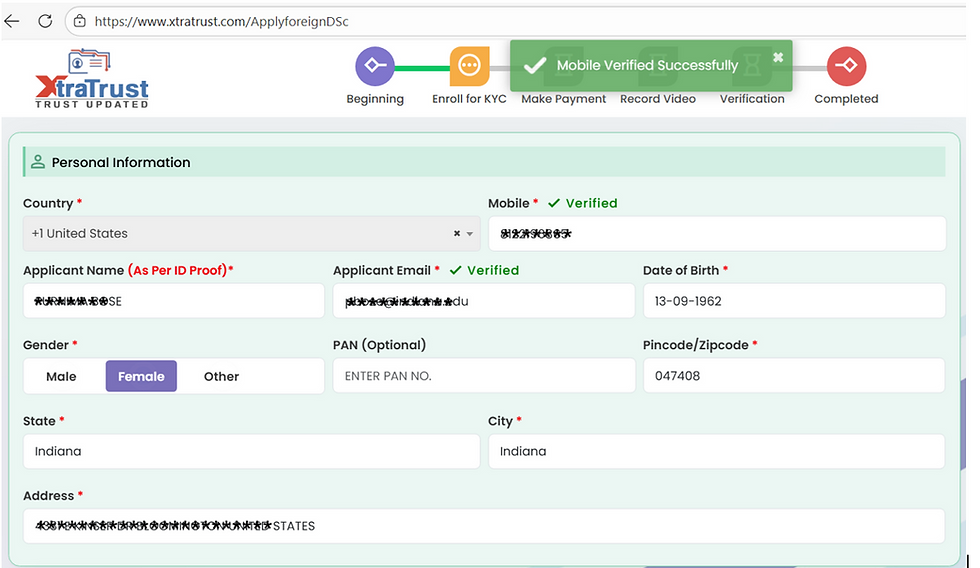
Step 3: Enter the Applicant details like Mobile Number with ISD Code, Name, eMail, DOB, PAN Number ( Enter PAN if applicant is having PAN Card ), address etc. Click on Verify button to get Mobile OTP, enter the OTP and submit.

After mobile verification it will show you the pop up.
Step 4: Enter eKYC Username ( Normally it will be mobile number, you can choose between Mobile, PAN Number etc. Keep eKYC PIN like 123456. Enter Applicant name in Remarks. Upload Documents like ID Proof, Address Proof, Photo, PAN Card if PAN Number entered. Enter Partner details - Registered email ID, Mobile Number and verifiy it.
If you do not enter your business partner details, you will not get commission.

Step 5: Choose Pay Later Option, Tick undertaking and Click Proceed Button on the right side of the page.

Step 6: DSC Will be enrolled. Write down the application ID for your reference. Click on Send KYC Video Recording Link button to send link on applicant eMail.

For any support contact us at 9873545477. Call 9873545477 WhatsApp 9873545477


Comments